



A video archive for iPhone and Android

Keep the videos worth keeping.

A recipe on Instagram, a workout on YouTube, a tip on X. Memora collects them together with your groups, AI turns each one into a summary you can actually read, and one word you remember finds it again.

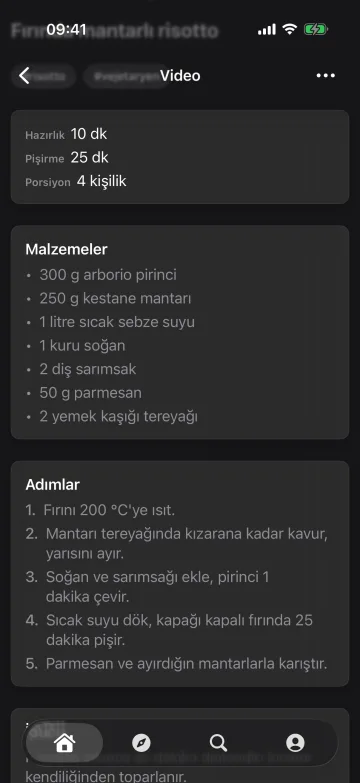
The AI summary of the risotto video: time, servings, ingredients and steps
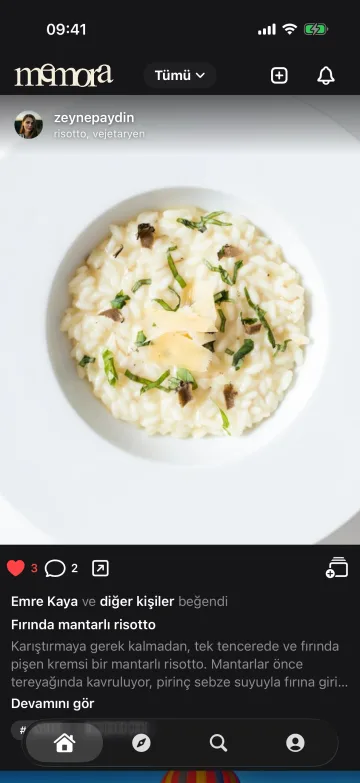
Memora home feed: an oven-baked mushroom risotto video shared in the Weekend Recipes group
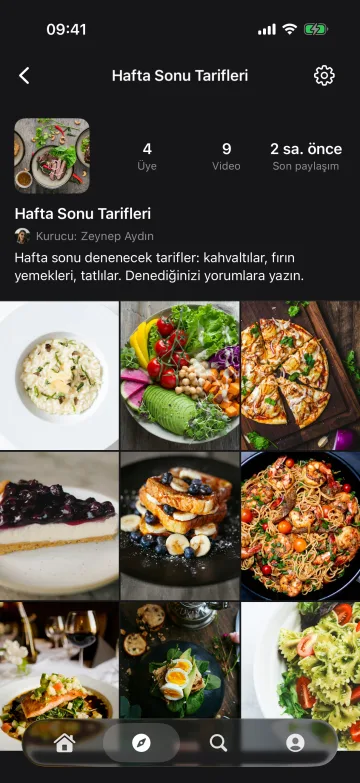
The Weekend Recipes group: cover, 4 members, 9 videos, founder Zeynep Aydın, description and the covers of the shared recipes

Screens shown with sample content (app in Turkish).

Saving is easy. Coming back isn't.

You already save videos; the hard part is finding them when you need them and remembering what they said. Memora does three things about that.

  1. 01 Saves time

    Remember a video without rewatching it

    AI turns every video into a readable summary: a recipe's ingredients, a trip's route, a workout's sets. Instead of playing the video again, you read the summary in seconds.

    SummaryStepsCategory

  2. 02 Finds it

    Find it with the one word you remember

    What you save on Instagram, YouTube, TikTok, X and Pinterest lives in one archive. Memora searches titles, summaries and every word said in the video, so you find it even when you've forgotten its name.

    TitleSummaryWhat was said

  3. 03 Together

    No more links lost in group chats

    Collect recipes with your family and trip plans with friends in a shared group. Everyone adds, everyone sees, and you can comment and like.

    GroupsInvite codeComments

Saved posts pile up as links. In Memora, you can read them.

An app's saved folder keeps links. Memora turns each link into an entry with a title, a category and a group.

In your saved folder In Memora
instagram.com/reel/C8kQ… 4 months ago
Oven-baked mushroom risotto Recipe Weekend Recipes
youtube.com/watch?v=8fT… 2 months ago
Two days in Cappadocia Travel Cappadocia Trip
tiktok.com/@…/video/73… 6 weeks ago
A 20-minute morning workout Fitness Morning Workout
x.com/…/status/18… 3 weeks ago
Moving to async/await in Swift Software iOS Notes
pinterest.com/pin/52… yesterday
Folding camp chairs compared Product Camping Prep

Sample entries.

No copying links. Three taps.

  1. Tap Share

    On a video in Instagram, YouTube, TikTok, X or Pinterest, pick Memora from the Share menu.

  2. Pick a group

    Add it to your own group or one you share with friends. Add a short note and tags if you like.

  3. Read the summary

    AI watches the video and extracts its title, a summary and details that fit its category.

Every video, summarized in its own shape

You don't want the same notes from a recipe and a travel video. Memora knows eight categories and extracts different fields for each.

Sample summary

  1. 01

    Recipe

    IngredientsStepsPrep and cook timeServingsTip

  2. 02

    Travel

    LocationWhy goHighlightsGetting thereEstimated budgetBest time to visit

  3. 03

    Software

    Tech stackCode snippetStepsResourcesDifficulty

  4. 04

    AI tools

    ToolUse caseExample promptStepsExample output

  5. 05

    Fitness

    ExercisesSets and repsTarget musclesDurationTip

  6. 06

    Products

    ProductPrice rangeKey featuresProsCons

  7. 07

    Books & films

    Titles, genre and ratingSummaryWhy it's recommended

  8. 08

    Self-improvement

    Core ideaActionable stepsSource

Fields fill in based on what the video contains.

An archive works better kept together

Groups

Collect recipes with your family and trip plans with friends. They join with an invite code.

Visibility
Groups are visible to members only by default. Make one public, or approve what members add before it goes live.
Comments and follows
Like, comment on and reply to posts, and follow your friends.
Safety
Block people you don't want to see and report inappropriate content. Our team reviews every report.

Frequently asked

Which platforms can I add videos from?

You can add links from Instagram, YouTube, TikTok, X (Twitter) and Pinterest.

Do I need to copy the link to add a video?

No. Tap Share in the app where the video is and pick Memora. You can also paste a link into the app.

Who can see my groups?

Groups are visible to their members only by default. Nobody else can see the content unless you make the group public.

How do I delete my account?

In the app, go to Settings → Delete My Account. Your account and personal data are permanently deleted.